Podcast Speaker Diarization: Transcripts With Speaker Labels
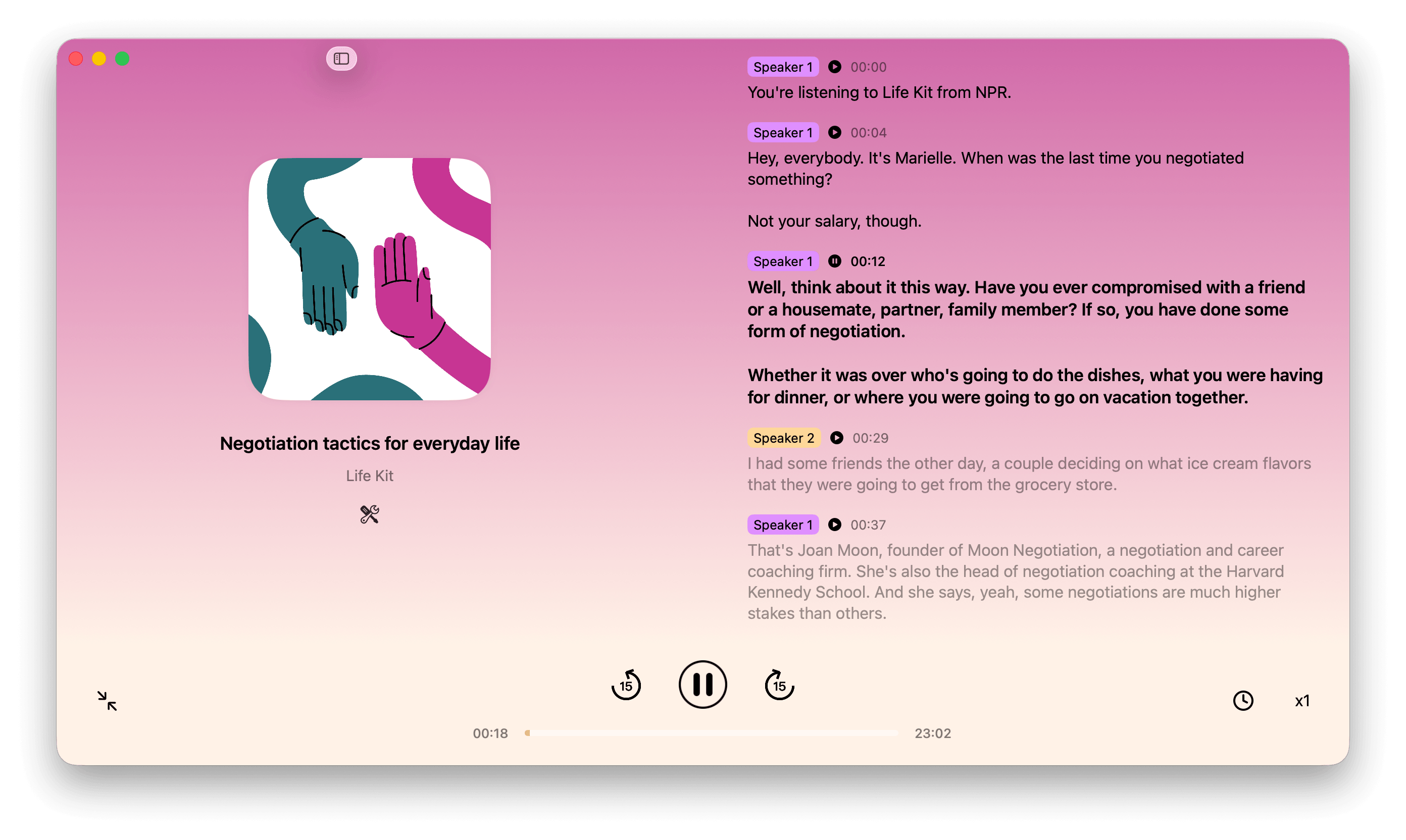
Podcast transcripts are easier to follow when you can see who is speaking. Lightcast now adds speaker diarization to podcast transcription, separating a conversation into speaker turns and labeling each part of the transcript. Instead of reading one long block of text, you can follow the host, guest, and other voices through an episode.
What Is Speaker Diarization?
Speaker diarization is the process of identifying when the speaker changes in an audio recording and grouping each stretch of speech by voice. In a podcast transcript, this means lines can be labeled by speaker, making it easier to see how a discussion moves between people.
Speaker labels describe voices in the recording; they do not always identify a person by their real name. Depending on the transcript, a speaker may appear as “Speaker 1,” “Speaker 2,” or another available label.
Follow Multi-Speaker Podcasts More Easily
Speaker-labeled transcription is especially useful for interviews, panel discussions, and roundtable episodes. When a conversation moves quickly, labels help you keep track of who made a point without replaying the entire episode.
- Scan a podcast transcript and distinguish one speaker’s comments from another’s.
- Review a guest’s answer or a host’s question without losing the flow of the conversation.
- Find a useful quote or idea in a long, multi-speaker episode.
Podcast Transcripts With Speaker Labels, Timestamps, and Playback
Each labeled section stays connected to its place in the episode. Timestamps and playback controls make it easier to return to a passage and hear it in context. Read through a transcript at your own pace, then listen to the moment you want to revisit.
Try Speaker Diarization in Lightcast
Open an episode in Lightcast and generate its transcript to see the conversation organized by speaker. Speaker diarization adds useful structure to AI podcast transcription, helping you read, review, and return to the parts of a podcast that matter to you.